Clone a faithful period machine, drive it in your browser, watch what it reaches for, save its state before you experiment, and write down what you learn. The Research VM Controller is the opposite of the exhibition tool: built to open a work up, not to keep it running.
Before a conservator can choose a strategy, they have to know what a work actually depends on:
which libraries it loads, which addresses it contacts, how it fails when something is missing. The only reliable way
to learn that is to run the work in a faithful environment and watch it closely — and to be free to experiment
without fear of losing progress.
First, analyse it You do not have to start from a blank machine. The
family’s analysis tool, artwork-autopsy, reads an unknown bundle — a zip, a disc image, a
loose folder — end to end and proposes what it is, where it begins, and which era of machine and
which runtimes it needs — a runtime being the player or plugin software a work cannot run without, such as
Flash, Director, or QuickTime. It decompiles the period runtimes — that is, reads their compiled programs back into
human-readable form — across Director, Flash, Java, QuickTime, VRML, .NET, Unity,
and reaches modern web art too (Electron apps, browser extensions). A work often ships its whole runtime beside
itself, so a scoping specialist tells the artwork apart from the bundled runtime. From the same evidence it
composes three views for three readers: a dependency manifest for the conservator, an asset catalogue for the researcher,
and “the artist’s hand” for the art historian — the artist’s own comments,
authorship, and contact URLs harvested from the source and decompiled code. That triage is the natural step
before the bench; it lives at its own home, autopsy.vmctl.org. The
workbench is where you take its proposal and put it to the test on a real running machine.
Running a work to understand it makes a research tool the opposite of an exhibition tool.
evmctl
Exhibition VM Controller. Keeps one known-good state running unattended; silently reverts on any error; boots full-screen into the work. Built for uptime.
rvmc
Research VM Controller (the system behind vmctl). A browser-based, AI-assisted workbench that exposes state, preserves every intermediate condition, and never resets a machine behind the researcher. Built for understanding.
The two share their foundations — the same virtualisation, the same snapshot mechanism, a host-side
controller, and an in-guest helper: a small program running inside the virtual machine itself (the
“guest”) that the workbench can talk to — through a common core library, vmctl-core. rvmc deliberately
removes three things from the exhibition side: the autonomous full-screen player, automatic
roll-back, and the physical-installation autonomy (sensors, watchdog timers) a gallery needs.
The guiding rule A research VM must never silently reset state under a
researcher. Snapshots, roll-backs, and resets are always explicit actions.
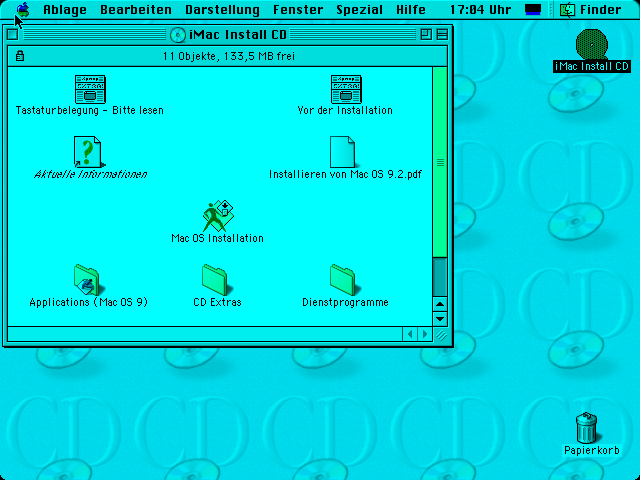
Figure 1.
A legacy guest rendered live in the browser through rvmc’s in-browser screen (noVNC). Because the
screen is captured at the host level, it needs no cooperation from the old software inside the VM.
With a base to clone and a runbook in hand — whether from artwork-autopsy or from your own knowledge of the work
— a session runs from an empty project to a finished, portable conservation recipe. That session, step by step, is
the next chapter.