
Chapter 7 · 7 of 9
Under the hood — for the people who host it
Everything so far has been about using the bench. This last chapter is for implementers: how rvmc is put together, and what an institution actually stands up to run it. You can use the workbench without reading a word of it.
Under the surface, rvmc is two tiers: a shared control plane, set up once per installation, fronting an isolated work area for each project or student group. The shape is deliberately generic and configuration-driven, so any institution can host it on its own hardware.
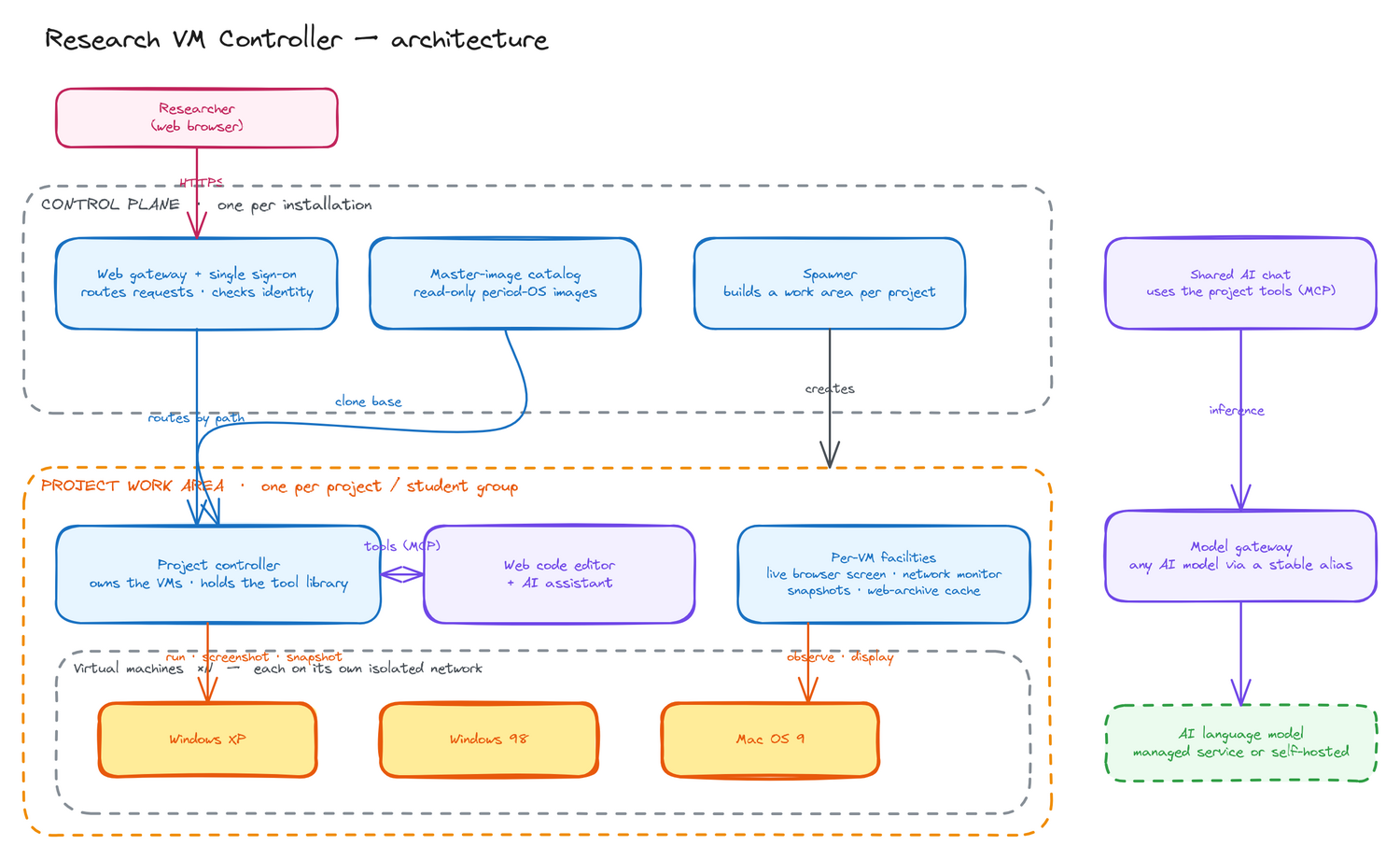
The two tiers
The control plane, one per installation, holds a registry of projects and a catalogue of read-only master images, an idempotent provisioner that creates and tears down each project’s work area, and the shared front door: single sign-on, a web gateway routing by path, and a model gateway that reaches the AI by a swappable alias. Each work area, one per project, runs a controller that owns the project’s VMs and its tool library, plus the things a researcher touches: a live in-browser screen per VM, a browser code editor with an AI assistant, a network monitor, snapshot management, and a local web-archive cache.
One tool library, two surfaces
A single collection of tools — controlling the VM, acting inside the guest, and the project’s own analysis helpers, over ninety project-scoped tools in all — is exposed over the open Model Context Protocol (MCP), and the same collection feeds both the chat assistant and the editor’s AI. Access follows identity: a researcher works within their own project; a project admin holds the destructive and onboarding operations; a master operates across all projects.
What you actually stand up
A conservation tool that leans on someone else’s cloud can rot the same way the art does, so the whole stack is built to be self-hosted: one Linux host with Docker and hardware virtualisation brings up everything it needs, and nothing reaches outside the institution unless the institution wires it there.
Bring your own model, your own login
The stack ships the gateway, not the models. LiteLLM starts with an empty model list; the institution wires in whatever it accepts — a fully self-hosted backend (Ollama, vLLM, llama.cpp) for a no-third-party deployment, a managed academic inference service, or a provider account. Because the controller hardcodes nothing and reaches the model by alias, swapping backends is a one-line change. Identity works the same way: log in locally, or broker the institution’s federation. Nothing is locked to one vendor.
Isolation by default
Each project’s containers run on their own Docker network, not a shared one. It matters: the in-project code editor runs with an integrated terminal and no internal auth, so on a shared network a member of one project could reach another project’s services directly. Per-project networks make that impossible at the Docker layer — cross-project traffic has no route and cross-project names don’t even resolve. Traefik is connected into every project network so it can still route users in, but the projects cannot reach each other.
Ingress decoupled from compute
The public front door is split from the heavy lifting. A tiny ingress node — a pure proxy, no virtualisation — holds the stable public address, the domain, and the TLS certificates, and tunnels back to the compute host where the VMs actually run. The public address stays put even if the compute moves between institutions, and the compute host (the one part that truly needs hardware virtualisation) can live wherever the RAM and KVM are. VMs run via libvirt today; an in-container option is on the roadmap, and a documented REST API (OpenAPI, per-project tokens) lets researchers script the bench. Standing it up is a config file, your own DNS, and your own model — and the institutions and people who make that worth doing are over on the vmctl family hub.